

MOMMY AI
FAQ
FREQUENTLY ASKED QUESTIONS
How do I start my free trial? Download Mommy AI, complete your onboarding profile, and your 7 day free trial begins automatically. You get full access to all features with a maximum of 30 AI messages during your trial. No credit card required to start.
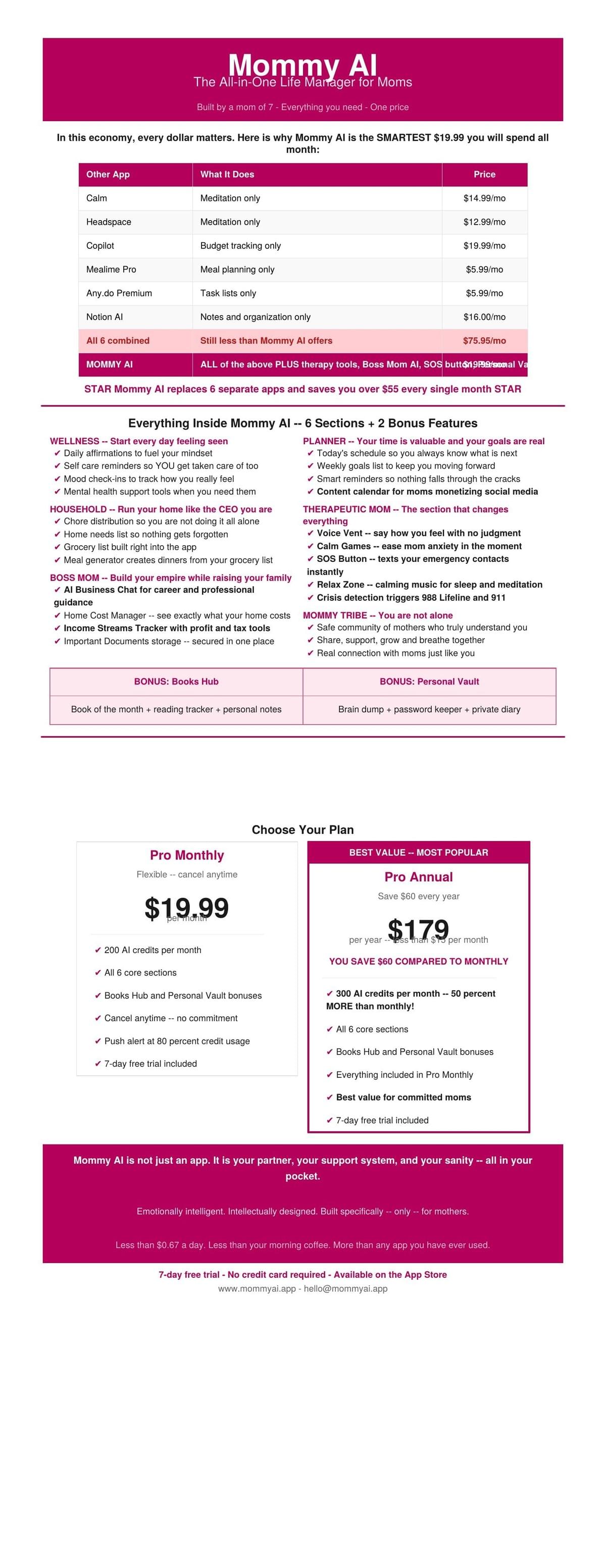
What happens after my free trial ends? After 7 day free trial ends. You will be prompted to choose a subscription plan to continue using Mommy AI. You can choose Pro Mom Monthly at $19.99 per month or Pro Mom Annual at $179 per year.
What is the difference between Pro Monthly and Pro Annual?Both plans include full access to every feature in Mommy AI. The difference is:
- Pro Monthly — $19.99/month — 200 AI credits per month — cancel anytime
- Pro Annual — $179/year — 300 AI credits per month — saves you $60 per year
The Annual plan is our best value and gives you more AI credits every month.
What are AI credits and how do they work?AI credits are the number of AI-powered interactions you can have each month. Every time you send a message to an AI feature inside the app — whether that's the Boss Mom AI, Therapeutic Mom, Wellness, or Household tools — it uses one credit. Credits reset on your monthly billing date. You will receive a push notification when you have used 80% of your credits for the month. During your free trial you receive 30 total credits.
How do I cancel my subscription? You can cancel your subscription at any time through your App Store or Google Play account settings. You can also tap Manage Subscription inside the Mommy AI app under the Support tab. Cancellations take effect at the end of your current billing period.
Can I get a refund? Yes. If you are not satisfied with your subscription you may request a refund within 7 days of your initial purchase by emailing hello@mommyai.app. Please include your account email and the reason for your request. Refunds after 7 days are not guaranteed except where required by law or through Apple or Google Play refund policies.
How do I delete my account? You can delete your account at any time by going to the Support tab inside the Mommy AI app and tapping Delete My Account. This will permanently delete all your data including your Personal Vault, diary entries, financial data, and emergency contacts within 30 days. This action cannot be undone.
Is my data safe?Absolutely. Mommy AI uses enterprise grade security including HTTPS encryption, AES-256 encryption at rest, and Row Level Security so only you can access your data. We never sell your personal information to anyone. Read our full Privacy Policy at mommyai.app/privacy-policy for complete details.
Is Mommy AI a therapy service? No. Mommy AI is an AI-powered support and wellness tool designed for mothers. It is NOT a licensed therapy service and is not a replacement for professional mental health care. If you are experiencing a mental health crisis please call or text 988 to reach the Suicide and Crisis Lifeline or text HOME to 741741 for the Crisis Text Line.
Why is the AI not responding? If the AI is not responding please check your internet connection and try again. If the issue persists please email us at hello@mommyai.app with your device type and a description of the issue and we will get back to you as quickly as possible.
How do I change my notification settings?Go to the Support tab in the app and tap Notifications to manage your daily affirmation and task reminder notification preferences. You can also manage notifications in your phone Settings under Mommy AI.
What is the Books Hub? The Books Hub is a personal development feature inside Mommy AI. It includes a curated Book of the Month selected by the Mommy AI team, a personal reading tracker where you can log your current book and keep notes. The Book of the Month includes an affiliate link to purchase the book through a third party retailer. We may earn a small commission at no additional cost to you.
How do I update my profile?You can update your profile information by going to the Settings or Profile section inside the app. If you need help updating your email address please contact us at hello@mommyai.app.
The app crashed. What do I do? We are sorry for the inconvenience! Please try closing and reopening the app. If the issue persists please email hello@mommyai.app with your device model, operating system version, and a description of what happened before the crash. Screenshots are very helpful!
What is the SOS button and how does it work?The SOS button is located inside the Therapeutic Mom section. When you tap it Mommy AI immediately sends a text message to the emergency contacts you have set up in the app. You can designate anyone — a partner, family member, or close friend — to receive your SOS message. You can update your emergency contacts at any time in your profile settings. Please note the SOS feature requires a working phone signal to deliver messages. In any life threatening emergency always call 911 directly.
Is my voice data stored or recorded?No. Voice content you share through the Voice Vent feature is processed in real time by our AI to generate a response and to detect any crisis-related language. Voice recordings are not permanently stored on our servers beyond your active session. Your voice data is processed by OpenAI solely to provide your in-app experience. We do not sell, share, or retain your voice recordings.
What is the Personal Vault and is it secure?The Personal Vault is your private secure space inside Mommy AI. It includes a Brain Dump section to clear your thoughts, a Password Vault to store credentials, and a personal Diary just for you. All vault content is encrypted using AES-256 encryption and is only accessible by you. Your vault data is permanently deleted within 30 days if you delete your account.
Can I use Mommy AI on Android?Mommy AI is currently available on iOS through the Apple App Store. Android availability is coming soon. Follow us on social media or join our waitlist at mommyai.app to be notified when Android launches.
Crisis Resources
If you or someone you know is in crisis please reach out immediately:
🆘 988 Suicide and Crisis Lifeline — Call or text 988💬
Crisis Text Line — Text HOME to 741741
🚨 Emergency Services — Call 911
You are not alone. Help is available 24 hours a day 7 days a week. 💕
Why Mommy AI is Worth Every Penny
© 2026